




Fluid is an open-source .NET template engine based on the Liquid template language. It is a secure template language that is also very accessible for non-programmer audiences.
This document describes Fluid 3.0, available on NuGet.org. Previews of the next version are available from the preview feed. To see the corresponding content for v1.0, use this version
Read the documentation at sebastienros.github.io/fluid, and try Fluid in your browser with the playground.
- Very fast Liquid parser and renderer (no-regexp), with few allocations. See benchmarks.
- Secure templates by allow-listing all available properties in the template. User templates can't break your application.
- Supports async filters. Templates can execute database queries more efficiently under load.
- Customize filters and tags with your own, even with complex grammar constructs. See Customizing tags and blocks.
- Parses templates into a concrete syntax tree that lets you cache, analyze, and alter the templates before they are rendered.
- Register any .NET types and properties, or define custom handlers to intercept when a named variable is accessed.
Deane Barker wrote a very comprehensive tutorial on how to write Liquid templates with Fluid. For a high-level overview, read The Four Levels of Fluid Development, which describes different stages of using Fluid.
- Using Fluid in your project
- Exposing .NET objects
- Source generators
- Adding custom filters
- Handling undefined values
- Rendering user-provided templates
- Encoding
- Cultures and time zones
- Additional filters
- Liquid syntax
- Customizing tags and blocks
- View engines
- Command line tool
- Performance
- Documentation
- Contributing
- Used by
<ul id="products">
  {% for product in products %}
    <li>
      <h2>{{product.name}}</h2>
      Only {{product.price | price }}

      {{product.description | prettyprint | paragraph }}
    </li>
  {% endfor %}
</ul><ul id="products">
<li>
<h2>Apple</h2>
$329
Flat-out fun.
</li>
<li>
<h2>Orange</h2>
$25
Colorful.
</li>
<li>
<h2>Banana</h2>
$99
Peel it.
</li>
</ul>Notice
- The
<li>tags are at the same index as in the template, even though the{% for }tag had some leading spaces - The
<ul>and<li>tags are on contiguous lines even though the{% for }is taking a full line.
You can directly reference the NuGet package.
The code samples in this document assume you have registered the Fluid namespace with using Fluid;.
After a successful build triggered by a push to main, preview packages are published to the
Fluid feed on feedz.io. Tagged releases continue to be published to NuGet.org.
Previews are versioned after the latest release, so they sort above it and below the next one: 3.0.1-preview.<run number>
after 3.0.0, or 3.1.0-beta.1.preview.<run number> after 3.1.0-beta.1.
dotnet nuget add source https://f.feedz.io/sebastienros/fluid/nuget/index.json --name fluid-preview
dotnet add package Fluid.Core --prerelease
Keep NuGet.org enabled so dependencies can be restored. If your NuGet.config uses package source
mapping, also map Fluid.* and MinimalApis.LiquidViews to the fluid-preview source.
var parser = new FluidParser();

var model = new { Firstname = "Bill", Lastname = "Gates" };
var source = "Hello {{ Firstname }} {{ Lastname }}";

if (parser.TryParse(source, out var template, out var error))
{
    var context = new TemplateContext(model);

    Console.WriteLine(template.Render(context));
}
else
{
    Console.WriteLine($"Error: {error}");
}Hello Bill Gates
TryParse returns parsing diagnostics as a string. Parse throws a ParseException with the line and column of the error instead, see Parsing errors.
- A
FluidParseris thread-safe and expensive to create: create it once and share it, for instance in astaticfield. - An
IFluidTemplateis thread-safe: cache parsed templates and render them concurrently. - A
TemplateOptionsis immutable and thread-safe: build it once with aTemplateOptionsBuilderand reuse it. CallToBuilder()to derive a variation, for instance one per tenant. - A
TemplateContextis not thread-safe: create a new one for every rendering.
private static readonly FluidParser _parser = new FluidParser();

private static readonly TemplateOptions _options = new TemplateOptionsBuilder()
    .WithCultureInfo(new CultureInfo("en-US"))
    .AddFilter("downcase", Downcase)
    .Build();

var context = new TemplateContext(model, _options);
Templates used by include and render are loaded from TemplateOptions.FileProvider, which can be asynchronous. See Parsing and rendering for file providers, scopes, cancellation and rendering to UTF-8.
Templates can read the public properties and fields of the model and of the objects reachable through it. Treat the model as the template's readable data boundary: when rendering an untrusted template, pass a dedicated model that contains only the data the template is allowed to read.
Values are converted to Liquid values (FluidValue) when templates use them. To change how a type is exposed, add a value converter, which can return a different object or a custom FluidValue:
var options = new TemplateOptionsBuilder()
    .AddValueConverter(value => value is IUser user ? user.Name : null)
    .Build();
System.Text.Json.Nodes values such as JsonObject and JsonArray can be used as models directly.
Member names are case-sensitive by default. Use WithModelNamesComparer(StringComparers.CamelCase) to read FirstName as {{ firstName }}, or another StringComparer.
Fluid works with NativeAOT and trimming: it falls back to reflection when dynamic code isn't supported, and the model accessor generator avoids reflection altogether.
See Models and values for value converters, custom FluidValue types and arrays, explicit member registrations, custom member accessors and NativeAOT compatibility.
The Fluid.SourceGenerator package contains two independent source generators. You can use either one, or both:
- Model accessors read the properties of your .NET types without reflection.
- Compiled templates turn
.liquidfiles into C# code at build time.
Add the package to the project that renders the templates:
<ItemGroup>
  <PackageReference Include="Fluid.SourceGenerator" Version="..." />
</ItemGroup>Without this generator, Fluid uses reflection to read the members of your models. That works in most applications. Use the generator when the application is published with NativeAOT or trimming, where reflection can fail because the trimmer removed the members. It also avoids building accessors at runtime.
List the model types on a partial class that derives from TemplateOptionsBuilder, then build the options from it:
[FluidRegister(typeof(Person))]
[FluidRegister(typeof(Address))]
public partial class AppTemplateOptionsBuilder : TemplateOptionsBuilder
{
}

var options = new AppTemplateOptionsBuilder().Build();
Templates can now read the public properties, public fields and parameterless methods of Person and Address, for example {{ person.Address.City }}. new TemplateContext(person, options) also detects a concrete Person model on its own.
See Model accessor generator for profile methods, the exact rules and the diagnostics.
This generator compiles .liquid files into C# classes at build time, for templates that ship with the application, such as emails or reports. A syntax error fails the build instead of a request, nothing is parsed at startup, and the templates render faster than parsed ones. Templates only known at runtime, such as templates stored in a database or edited by users, are parsed with FluidParser as usual. Compiled templates can't use custom tags or operators, nor the tablerow, ifchanged and doc tags.
<ItemGroup>
  <AdditionalFiles Include="Templates/**/*.liquid" />
</ItemGroup>[FluidTemplates("Templates/*.liquid")]
public static partial class Templates
{
}
// Templates/welcome-email.liquid
var html = await Templates.WelcomeEmail.RenderAsync(context);See Compiled template generator for glob patterns, parser options, partials, naming rules and the diagnostics.
Filters can be async or not. They are defined as a delegate that accepts an input, a set of arguments and the current context of the rendering process.
public static ValueTask<FluidValue> Downcase(FluidValue input, FilterArguments arguments, TemplateContext context)
{
    return StringValue.Create(input.ToStringValue(context).ToLower());
}

var options = new TemplateOptionsBuilder()
    .AddFilter("downcase", Downcase)
.Build();By default, undefined variables and filters render as empty strings, and unknown filters return their input. To fail fast instead, enable strict modes, which throw a FluidException:
var options = new TemplateOptionsBuilder()
    .WithStrictVariables()
    .WithStrictFilters()
    .Build();
To track missing values or render a fallback, set a delegate that receives the path of each undefined variable:
var options = new TemplateOptionsBuilder()
    .WithUndefined((path, type) =>
    {
        logger.LogWarning("Missing variable: {Path}", path);
        return ValueTask.FromResult<FluidValue>(NilValue.Instance);
    })
    .Build();
See Handling undefined values for more examples.
Fluid is a template engine, not a security sandbox. When templates come from users:
- Limit the template source length before parsing.
- Pass a dedicated model containing only data the user is allowed to read.
- Configure recursion, work, output and collection limits:
MaxSteps,MaxOutputSizeandMaxCollectionSizeare unlimited by default. - Set a per-render cancellation deadline with
TemplateContext.CancellationToken. - Keep the default null file provider, or use one scoped to the tenant, if templates don't need
include,renderorfrom. - Only expose trusted custom filters, tags and values.
private static readonly TemplateOptions UserTemplateOptions = new TemplateOptionsBuilder()
    .WithMaxRecursion(20)
    .WithMaxSteps(10_000)
    .WithMaxOutputSize(1_000_000)
    .WithMaxCollectionSize(10_000)
    .Build();
See Security for what each limit counts and a complete example.
By default, Fluid doesn't encode the output. Pass an encoder when rendering, for instance HtmlEncoder.Default, or HtmlEncoder.Create(UnicodeRanges.All) to keep non-ASCII text readable:
var html = await template.RenderAsync(context, HtmlEncoder.Default);The raw filter and the {% raw %} tag prevent a value from being encoded, and the content of a capture block isn't encoded twice:
{% assign html = '<em>This is some html</em>' %}

Encoded: {{ html }}
Not encoded: {{ html | raw }}
The json filter uses the JsonSerializerOptions set with TemplateOptionsBuilder.WithJsonSerializerOptions(). See Encoding for details.
Templates are rendered with the invariant culture by default, so that results are consistent across systems. Set a culture with TemplateOptionsBuilder.WithCultureInfo() or TemplateContext.CultureInfo:
var options = new TemplateOptionsBuilder()
    .WithCultureInfo(new CultureInfo("fr-FR"))
    .Build();
{{ 1234.56 }}
{{ "now" | date: "%A %-d %B %Y" }}The time zone, set with TemplateOptionsBuilder.WithTimeZone() or TemplateContext.TimeZone, is used when parsing date strings without an offset, and for "now", the current time in that time zone like Ruby's Time.now (breaking change: it used to keep the offset of TemplateContext.Now(), the machine's one by default). To display a date in another time zone, use the time_zone filter:
{{ published | time_zone: 'America/New_York' | date: '%+' }}Like in Ruby, %Z is the abbreviation of the time zone, like EST, read from the system's time zone database on Linux and macOS (the offset on Windows), UTC for UTC times, and empty for a time with another offset than the time zone's. Breaking change: it used to be the offset.
A TimeSpan renders like 13:00:00, and the date filters read it as a time of day in that time zone, so {{ opening | date: '%H:%M %z' }} renders 13:00 -0500 in New York.
Dates behave like Ruby's in Liquid. A moment renders like a Time, with its offset (2026-03-04 13:00:00 -0500, or UTC for a DateTime of Utc kind), and a DateTime of Unspecified kind is read in that time zone, never in the machine's one. A DateOnly is like a Date: it renders 2026-03-04 and is read at midnight UTC. A TimeOnly renders 13:00:00 and is read on the current date. Dates are ordered in <, > and sort, and so are two TimeOnly or two TimeSpan values, and are 0 in math filters: do date math on their Unix time, like {{ starts | date: '%s' | plus: 86400 | date: '%F' }}. Only integers are timestamps, so {{ 0.5 | date: '%L' }} returns 0.5. Breaking change: dates used to render in UTC (2026-03-04 18:00:00Z), Unspecified ones got the machine's offset, a DateOnly became a string like 03/04/2026 (read as April 3), comparing dates was always false, a date was its number of ticks in math filters, and numbers with a fraction were timestamps.
See Cultures, dates and time zones and Working with time zones.
Fluid provides some non-standard filters by default, which format values with .NET format strings and an optional culture name:
| Source | Result |
|---|---|
{{ "now" | format_date: "G" }} |
6/15/2009 1:45:30 PM |
{{ 123 | format_number: "N" }} |
123.00 |
{{ "hello {0} {1:C}" | format_string: "world", 123 }} |
hello world $123.00 |
The Shopify money filters and the color filters are opt-in:
var options = new TemplateOptionsBuilder()
    .WithMoneyFilters()
    .WithColorFilters()
.Build();| Source | Result |
|---|---|
{{ 1134.65 | money }} |
$1,134.65 |
{{ 1134.65 | money_with_currency }} |
$1,134.65 USD |
{{ 'rgb(10%, 10%, 20%)' | color_to_hex }} |
#1a1a33 |
See Optional and Fluid-specific filters for currencies, amounts in cents, custom money formats and supported colors.
Fluid follows the syntax and the behavior of Shopify Liquid.
By default, all spaces and new lines of a template are preserved. Hyphens strip the whitespace on their side of a tag or an output:
{% assign name = "Bill" -%}
{{ name }}
renders Bill without the new line that follows the assign tag. TemplateOptionsBuilder.WithTrimming() strips whitespace automatically, even without hyphens.
render renders a partial in an isolated context, and include in the context of the template. Partials are loaded from TemplateOptions.FileProvider:
{% render 'product-card', product: product %}
{% render 'product-card' for products as product %}Some extensions that are not part of Liquid can be enabled on the parser:
var parser = new FluidParser(new FluidParserOptions
{
    AllowFunctions = true,             // {% macro %}, {% from %} and {{ field('user') }}
    AllowParentheses = true,           // {{ 1 | plus: (2 | times: 3) }}
    AllowStringEscapeSequences = true, // {{ "line\nbreak" }}
    AllowLiquidTag = true,             // {% liquid ... %}
});
With functions enabled, macro declares reusable chunks of content that are invoked like functions, and from imports the macros of another template:
{% macro field(name, value='', type='text') %}
<input type="{{ type }}" name="{{ name }}" value="{{ value }}" />
{% endmacro %}

{{ field('user') }}
{{ field('pass', type='password') }}
See Liquid syntax for how Fluid reads tags like Shopify, include and render, whitespace, the self object, macros and the other extensions.
Fluid's grammar can be extended with custom tags, blocks and operators. The parser is based on Parlot, which makes it completely extensible.
parser.RegisterIdentifierTag("hello", (identifier, writer, encoder, context) =>
{
    writer.Write("Hello ");
    writer.Write(identifier);
});
{% hello you %}Blocks also receive the statements they contain:
parser.RegisterExpressionBlock("repeat", async (value, statements, writer, encoder, context) =>
{
    var count = (await value.EvaluateAsync(context)).ToNumberValue(context);

    for (var i = 0; i < count; i++)
    {
        await statements.RenderStatementsAsync(writer, encoder, context);
    }

    return Completion.Normal;
});
{% repeat 1 | plus: 2 %}Hi! {% endrepeat %}renders Hi! Hi! Hi! . Custom operators are registered with parser.RegisteredOperators.
Templates can also be analyzed and rewritten with the AstVisitor and AstRewriter classes. See Extending the grammar for blocks, custom parsers, operators, functions and visitors.
The Fluid.MvcViewEngine package lets ASP.NET Core MVC render Liquid views, alone or with Razor, with layouts, sections and _ViewStart.liquid files:
services.AddMvc().AddFluid();A view selects a layout and fills its sections, and the layout renders them:
{% layout '_layout.liquid' %}

This is the home page

{% section footer %}
  This text will go in the footer
{% endsection %}<html>
<body>
{% renderbody %}
<div class="footer">{% rendersection footer %}</div>
</body>
</html>A view, a layout or a partial that can't be found throws a FileNotFoundException, unless FluidViewEngineOptions.TemplateNotFound renders something else (see Missing views, layouts and partials).
Fluid.ViewEngine provides the same features without MVC, and MinimalApis.LiquidViews renders Liquid views from Minimal APIs. See View engines.
The Fluid.Core.Tool .NET tool installs a liquid command that renders Liquid templates from any shell, with JSON read from stdin (or --data <file>) as the model.
dotnet tool install -g Fluid.Core.Tool
echo '{"name":"World"}' | liquid -e "Hello {{ name | upcase }}!"
liquid page.liquid --data model.json --output page.html
liquid -e "{{ user }} on {{ env.HOME }}" --set user=Bob --env
liquid page.liquid --validate
Run liquid --help, or see the tool's README, for all options, such as include paths, culture, time zone, strict mode and execution limits.
Fluid is faster and allocates less memory than all other well-known .NET Liquid parsers. To get the best performance, cache IFluidTemplate instances, and reuse the FluidParser and TemplateOptions instances (see Reusing instances).
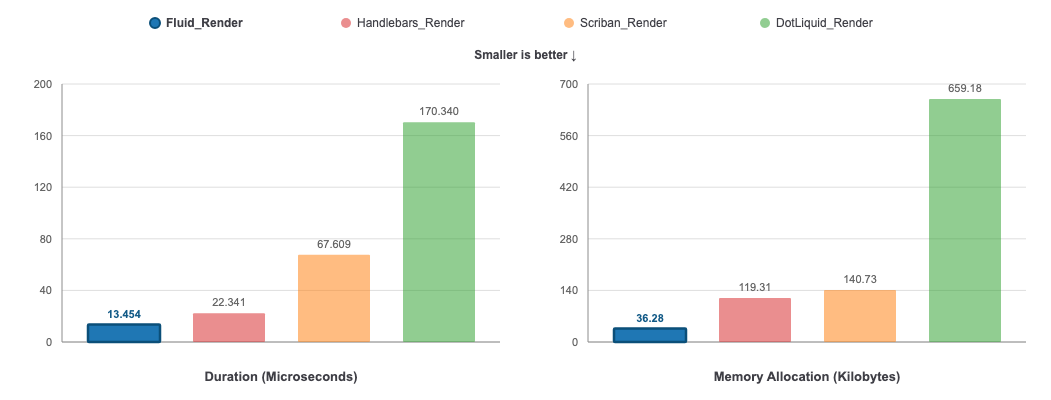
See Benchmarks for parsing results, compiled templates and the Benchmark.NET data.
The documentation site covers the details, and the playground renders templates with Fluid in your browser.
- Getting started
- Parsing and rendering
- Models and values
- Model accessor generator
- Compiled template generator
- Security
- Liquid syntax
- Optional and Fluid-specific filters
- Cultures, dates and time zones
- Working with time zones
- Extending the grammar
- View engines
- Benchmarks
When questioning the result of a template, compare it with the Liquid gem, as described in Contributing.
Build with dotnet build and test with dotnet test: see AGENTS.md for the build rules, the Golden Liquid tests and the architecture.
Fluid follows the Liquid gem, the reference implementation. To check what the gem renders, and compare it with Fluid, run a template in Docker with scripts/liquid-gem/liquid-gem.cs:
dotnet run scripts/liquid-gem/liquid-gem.cs -- -e '{{ "a,b" | split: "," | join: "-" }}'
dotnet run scripts/liquid-gem/liquid-gem.cs -- -c -e '{%- for i in (1..3) -%} {{ i }} {% endfor -%}'
dotnet run scripts/liquid-gem/liquid-gem.cs -- -c template.liquid -d data.json -z America/New_York
-c renders the template with Fluid too and shows the difference, -d (a file) or -j (inline JSON) gives its variables, and --help lists the options, like the notation for dates. It needs Docker.
Fluid is known to be used in the following projects:
- Orchard Core CMS Open Source .NET modular framework and CMS
- MaltReport OpenDocument/OfficeOpenXML powered reporting engine for .NET and Mono
- Elsa Workflows .NET Workflows Library
- FluentEmail All in one email sender for .NET
- NJsonSchema Library to read, generate and validate JSON Schema draft v4+ schemas
- NSwag Swagger/OpenAPI 2.0 and 3.0 toolchain for .NET
- Optimizely An enterprise .NET CMS
- Rock Relationship Management System
- TemplateTo Powerful Template Based Document Generation
- Weavo Liquid Loom A Liquid Template generator/editor + corresponding Azure Logic Apps Connector / Microsoft Power Automate Connector
- Semantic Kernel Integrate cutting-edge LLM technology quickly and easily into your apps
- Mailgen A .NET package that generates clean, responsive HTML e-mails for sending transactional mail
- LiquidPages Middleware that can be used with any web server to render liquid templates.
Please create a pull request to be listed here.