A terminal viewer for JSON Lines (JSONL/NDJSON) files. Browse records, search nested JSON, and inspect long strings as readable, word-wrapped text—useful for logs, datasets, and LLM agent traces.
jlv-demo.mp4
Install the jsonl-viewer package with uv
or pipx; both manage an isolated environment for the tool.
The command is still jlv:
uv tool install jsonl-viewer
jlv your-file.jsonl
Alternatively, with pipx:
pipx install jsonl-viewer
jlv your-file.jsonl
On Debian/Ubuntu, you can install pipx with sudo apt install pipx, then run
pipx ensurepath and open a new terminal.
If you already have a virtual environment activated, you can use
python -m pip install jsonl-viewer. For a system-managed Python installation,
use uv or pipx to avoid the externally-managed-environment error.
From a source checkout:
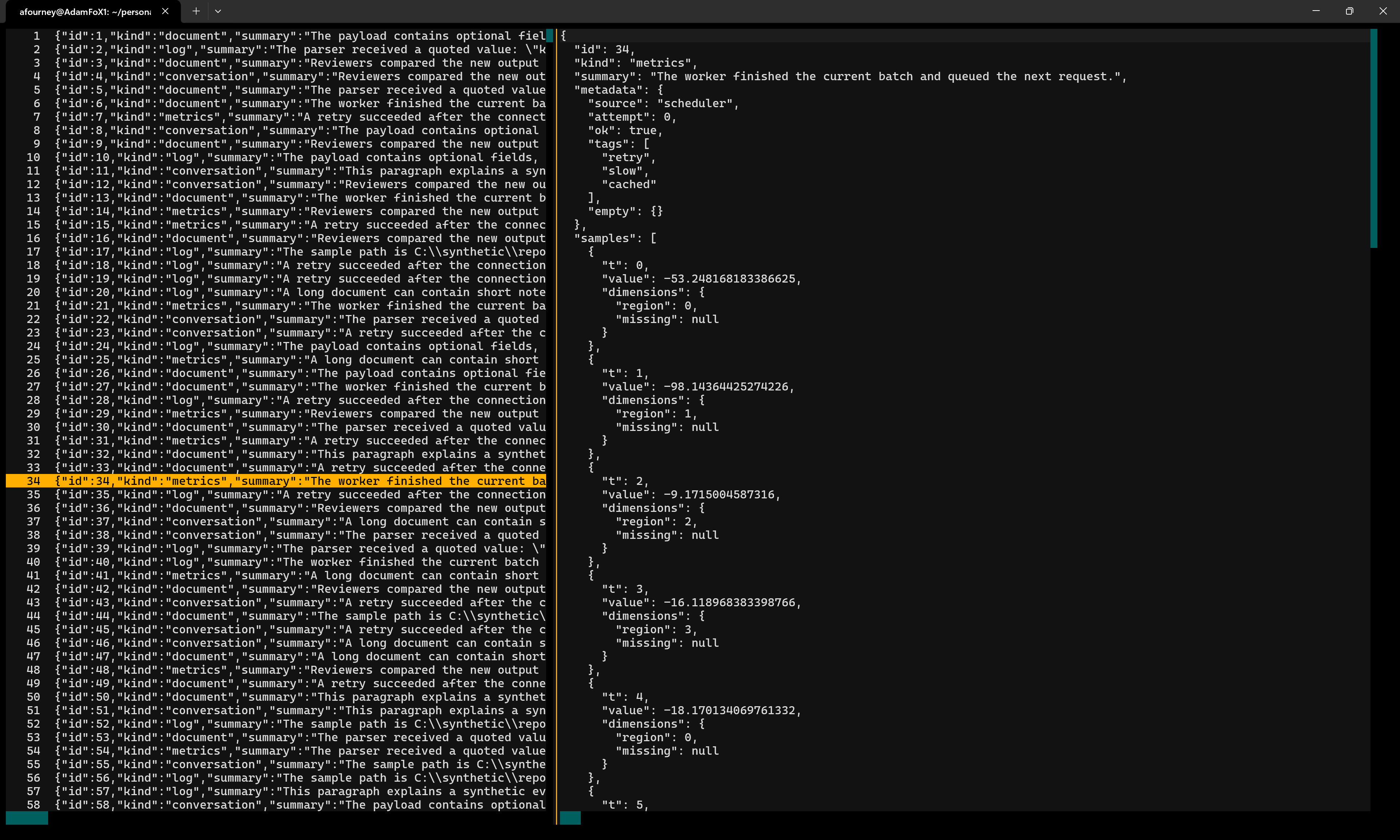
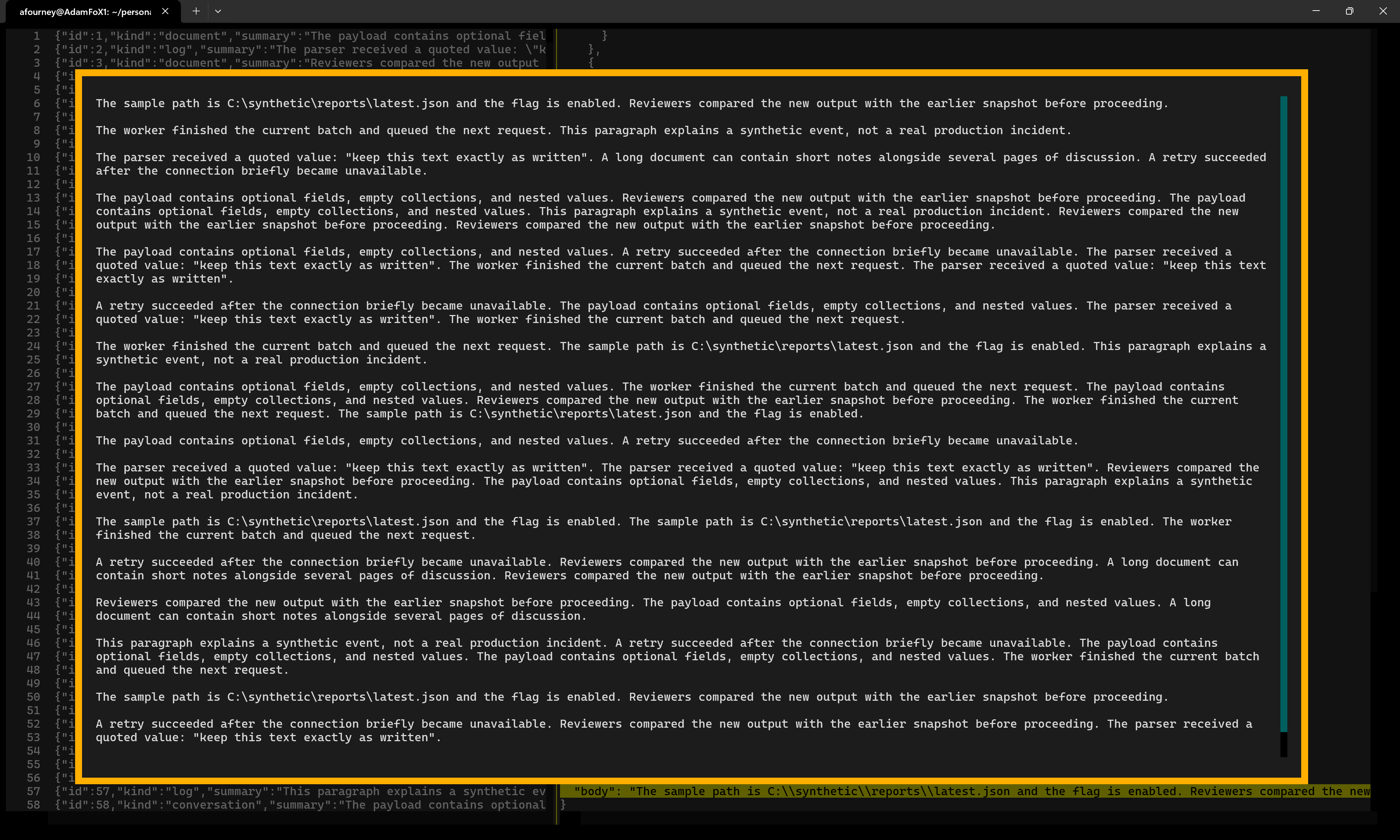
uv run jlv your-file.jsonlRequires Python 3.12+ and Textual 8+. The left panel lists numbered records; the right panel shows the selected record as indented JSON. The focused panel shows a bright row highlight; the record list keeps a dimmed highlight on the selected record while the JSON preview has focus. Select a string to read its decoded contents in a scrollable, word-wrapped inspector.
Browse records alongside their formatted JSON:
Open a string to read its decoded, word-wrapped contents:
| Key / action | Effect |
|---|---|
| Up / Down, k / j | Select the previous / next record or line |
| Page Up / Page Down | Move by a page |
| Home / End, gg / G | Move to the first / last row |
| Tab / Shift+Tab | Switch panels |
| Left / Right, h / l | Scroll horizontally where available |
| 0 / $ | Reveal the start / end of the current line |
| [ / ] | Navigate object/array block starts in the JSON preview |
| % | Jump between matching object/array delimiters in the JSON preview |
| Enter | Drill down: from the record list into the JSON preview, then into a selected string |
| Click | Select a record, or inspect a string in the JSON preview |
| > / < | Decode a JSON-encoded string in place (JSON preview or string inspector) / undo the last decode |
| Mouse wheel / scrollbars | Scroll the panel under the pointer |
| Ctrl+F, /, ? | Open search (both / and ? search forward) |
| Enter in search | Find next match and return focus to the panel |
| Enter in a main panel while search is open | Close search, focus the JSON preview, and inspect its current line if it is a string |
| F3, n | Find next match |
| Shift+F3, N | Find previous match |
| :number then Enter | Jump to a 1-based line in the originating panel |
| :q then Enter | Close the string inspector, or quit from a main panel |
| Alt+R / Alt+C | Toggle Regex / Match case while search is open |
| Escape | Back out one level: close search, then the string inspector, then move from the JSON preview to the record list |
The inspector is read-only and supports text selection and Ctrl+C to copy. The main panels also support text selection. The left-hand preview is capped at 1,000 characters, but the right-hand document and decoded strings are not truncated.
The main panels share one search across the full formatted JSON, including text
beyond the left panel's truncated previews. A result selects its record on the
left and highlights the matching text on the right, scrolling it into view.
F3 and Shift+F3 (or n and N with a panel focused) move between individual
matches, including matches in the same record, and wrap at either end of the
file. Escape closes the search bar.
Inside the string inspector, search is independent and limited to that decoded string.
Search defaults to literal, case-insensitive matching. Use Alt+R for regular expressions and Alt+C for case-sensitive matching; the search bar displays both settings. Press Enter to search after editing the query or changing an option.
Some JSONL files store JSON inside string values, sometimes encoded more than
once. When the selected string in the JSON preview holds encoded JSON, a hint in
the bottom-right corner says so. Press > to show its decoded value in place,
and > again to decode another layer; press < to undo one decode. Only strings
that decode to an object, array, or another string are expanded; anything else
rings the bell. Decoding is view-only: changing records or jumping to a search
result restores the original record, and search always runs against the
original text.
The string inspector supports the same keys, and its bottom border shows which
apply. > replaces the string with its decoded text, or with pretty-printed JSON
once it decodes to an object or array, and < undoes it. Once it shows JSON,
each further > decodes every string at any depth that holds encoded JSON, by
one layer, ringing the bell only when none do. The inspector's search covers
whatever it currently shows.
Both main panels render only visible rows, rather than creating a widget for every record or JSON field. The viewer opens after reading a small initial batch, then validates and indexes the remaining records in a background thread. A status line shows progress, and newly indexed records become available without resetting your selection or scroll position. You can navigate and inspect strings while indexing continues. Full-file search, End/G in the record panel, and jumps beyond the indexed records report that indexing must finish first; string-inspector search and navigation within the current record remain available.
The loader uses native byte-oriented JSON validation and a compact byte-offset index. It decodes only short prefixes for preview measurements, preserving Python's JSON compatibility and diagnostics for exceptional records. Records are read and parsed on demand; small bounded caches retain recent previews and formatted documents. The string inspector also renders a viewport, and defers wrapping until its actual display width is known.
Malformed JSON, invalid UTF-8, and interior blank lines are reported with a line number when encountered. An error in the initial batch prevents opening; a later error stops indexing and remains visible in the status line while previously validated records remain browsable. Exiting after such an error returns a nonzero status. Trailing blank lines are permitted. Quitting cancels background work. Indexes and previews stay in memory; the viewer does not write sidecar files or disk caches. Non-seekable inputs are still spooled to a temporary file before opening. This is a read-only viewer, not a live file follower; do not edit the input file while viewing it.
The terminal probe measures CLI invocation to the first interactive frame, navigation latency, and optionally completion of background indexing:
uv run python tools/terminal_startup.py stress-test.jsonl \
  --navigation-samples 20 --wait-for-index --output /tmp/jlv-startup.json
The probe reads its input in place and discards terminal output. Its JSON report contains timings, memory usage, and file metadata, never record contents. It requires at least one more record than the requested navigation samples.
The repository includes stress-test.jsonl.gz, a compressed synthetic dataset
with 30,000 records. Extract it before opening it:
gzip -dk stress-test.jsonl.gz
uv run jlv stress-test.jsonl
The extracted file is 300 MB and is Git-ignored. Records range from approximately 1-100 KB and contain nested structures and strings of varying lengths. Some strings intentionally end mid-sentence to fit the generated record sizes.